Installation
Requirements
ChemLink runs on Linux HPC nodes with NVIDIA GPUs. The installer handles all scientific tool compilation and Conda environment creation.
- Linux (Ubuntu 22.04+ recommended)
- NVIDIA GPU with CUDA 12.x drivers
- CUDA Toolkit 12.x, OpenMPI, cmake (for
--full install)
- SLURM (optional, for distributed mode)
Minimum tested hardware
The benchmarks reported below were obtained on the following configuration. Any node that meets or exceeds these specs should replicate the published performance.
| Component | Manager | worker1 | worker2 |
|---|
| CPU | Intel Core Ultra 9 285 (24 cores / 24 threads) | Intel Core i9-10900 est. (10 cores / 20 threads) | Intel Core i7-12700 (12 cores / 20 threads) |
| RAM | 32 GB | 64 GB | 32 GB |
| GPU | RTX 5060 Ti 16 GB (Blackwell, sm_120) | RTX 3080 10 GB (Ampere, sm_86) | RTX 3060 LHR 12 GB (Ampere, sm_86) |
| Storage | SK Hynix NVMe SSD 1 TB | Samsung NVMe SSD 1 TB | Samsung NVMe SSD 1 TB |
| Network | Intel GbE + Wi-Fi 7 | Intel I219-LM GbE (1 Gbps) | Intel I219-LM GbE (1 Gbps) |
| OS | Ubuntu 24.04 LTS | Ubuntu 24.04 LTS | Ubuntu 24.04 LTS |
| CUDA | 12.x | 12.x | 12.x |
Quick install
bash# Installs ChemLink in /opt/chemlink with Conda envs bio + mgl_legacy
curl -fsSL https://raw.githubusercontent.com/PipeJF9/chemlink/main/install.sh | bash
Full install (with scientific tools)
bash# Compiles fpocket, AutoGrid4, AutoDock4, AutoDock-GPU, GROMACS 2025.4
# Estimated: 45–90 min — requires CUDA Toolkit, OpenMPI, cmake
curl -fsSL https://raw.githubusercontent.com/PipeJF9/chemlink/main/install.sh | bash -s -- --full
Installer options
| Option | Description |
|---|
| --full | Compile all scientific tools + GROMACS |
| --with-gromacs | Compile GROMACS only |
| --dir PATH | Install directory (default: /opt/chemlink) |
| --version TAG | Git branch/tag (default: main) |
| --skip-conda | Skip Conda environment creation |
Verify installation
bashchemlink doctor          # check environment, GPU, and dependencies
chemlink docking --help  # docking pipeline options
chemlink dynamic --help # dynamics pipeline options
Configuration
ChemLink pipelines are configured via CLI flags at runtime. The chemlink doctor command verifies that the environment is correctly set up before running a pipeline.
Conda environments
| Environment | Contents | Used by |
|---|
| bio | Python 3.10, ACPYPE, AmberTools, OpenBabel, RDKit, pdbfixer, biopython | Docking & dynamics preparation |
| mgl_legacy | Python 2, MGLTools, pythonsh | AutoDock4 file preparation |
Environment variables
| Variable | Description |
|---|
| GMXRC | Path to GROMACS environment script (auto-set by installer) |
| CUDA_VISIBLE_DEVICES | Override visible GPUs for docking runs |
| SLURM_ARRAY_TASK_ID | Set automatically by SLURM for distributed array jobs |
Shared storage
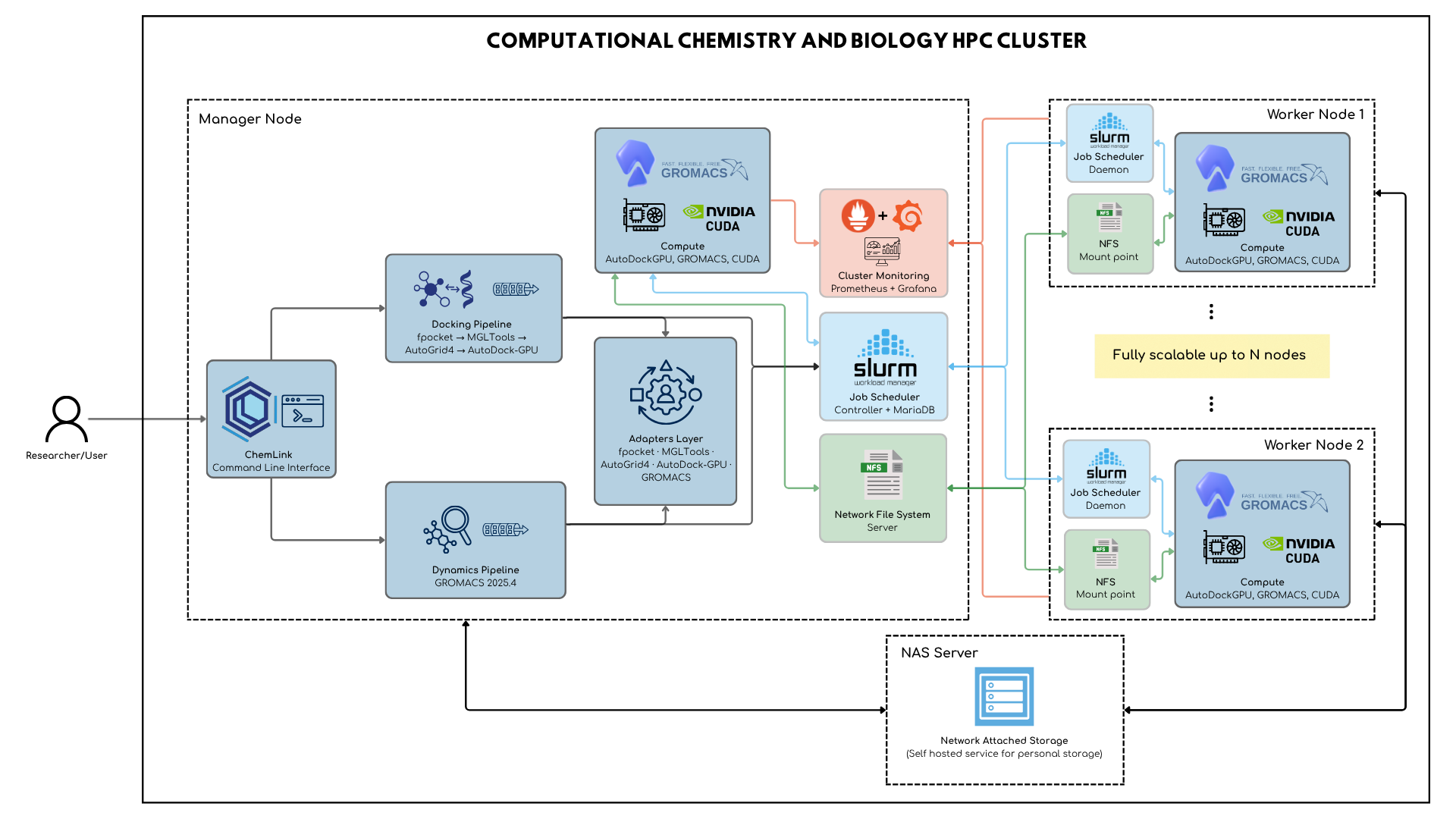
The lab uses two independent shared storage systems with distinct purposes:
| System | Where it runs | Mount point | Purpose |
|---|
| NFS v4 | Linux kernel on manager node | /nfs/chemlink | ChemLink computation — code, Conda envs, inputs, intermediates, and results. Mounted on every compute node; required for all pipeline runs. |
| SMB/CIFS (Samba) | OpenMediaVault NAS node | per-user share | Personal and team storage — accessible from Windows, macOS, and Linux. Used for backups, raw data, and researcher files. Not involved in ChemLink pipelines. |
Commands
Core pipelines
| Command | Description |
|---|
| chemlink docking | Run the molecular docking pipeline (fpocket → AutoGrid4 → AutoDock-GPU) |
| chemlink dynamic | Run the molecular dynamics pipeline (GROMACS 2025.4) |
Utility
| Command | Description |
|---|
| chemlink doctor | Check environment, GPU availability, and all dependencies |
Example: docking workflow
bash# Single-node docking run
chemlink docking \
  --receptor inputs/protein.pdb \
  --ligands  inputs/ligands/ \
  --out      results/docking/

# Distributed: SLURM Job Array across 4 GPU nodes
chemlink docking \
  --receptor /nfs/chemlink/protein.pdb \
  --ligands  /nfs/chemlink/ligands/ \
  --nodes    4 \
  --slurm
Example: dynamic workflow
bash# Protein-ligand MD simulation with GROMACS
chemlink dynamic \
  --system  protein-ligand \
  --input   inputs/complex.pdb \
  --out     results/md/ \
  --gpu     --mpi-ranks 8
Flags & options
chemlink docking
| Flag | Default | Description |
|---|
| --receptor PATH | required | Receptor PDB file |
| --ligands PATH | required | Ligand file or directory (.pdbqt / .sdf) |
| --out PATH | ./docking_out | Output directory |
| --nodes N | 1 | SLURM node count for distributed mode |
| --slurm | false | Submit via SLURM Job Array |
| --dry-run | false | Validate inputs without running |
chemlink dynamic
| Flag | Default | Description |
|---|
| --system TYPE | required | protein | protein-ligand | membrane | protein-membrane | ligand | custom |
| --input PATH | required | Input structure file (.pdb / .gro) |
| --out PATH | ./md_out | Output directory |
| --gpu | false | Enable CUDA GPU acceleration |
| --mpi-ranks N | 1 | MPI rank count for parallel run |
| --slurm | false | Submit via SLURM |
HPC cluster guide
Cluster requirements
ChemLink is designed for a SLURM-managed cluster with NFS shared storage. All nodes must be reachable via passwordless SSH from the head node. The cluster uses two independent storage systems: NFS v4 served by the Linux kernel on the manager node (exports /nfs/chemlink, mounted on all compute nodes — this is what ChemLink uses), and a dedicated OpenMediaVault NAS node that serves SMB/CIFS/Samba for personal and team file storage accessible from any OS. The two are fully independent and serve different purposes.
bash# Verify cluster connectivity
chemlink doctor --check cluster

# Test NFS mount on all nodes
chemlink doctor --check nfs
SLURM Job Arrays
Pass --slurm and --nodes N to any pipeline to submit a SLURM Job Array. ChemLink automatically partitions the ligand set or MD replicas across array tasks.
bash# Docking campaign: 1000 ligands across 10 GPU nodes
chemlink docking \
  --receptor /nfs/chemlink/targets/cdk2.pdbqt \
  --ligands  /nfs/chemlink/ligands/set_1000/ \
  --nodes    10 \
  --slurm \
  --partition gpu
GPU architecture targets
AutoDock-GPU and GROMACS are compiled for sm_89 (Ada Lovelace), sm_90 (Hopper), and sm_120 (Blackwell) architectures. Run chemlink doctor to confirm your GPU is detected.
Monitoring
The cluster ships with Prometheus + Grafana for real-time node and GPU monitoring. Access the Grafana dashboard on the head node at port 3000.
Performance tips
- Use NFS for all input/output paths — avoid local-only paths in multi-node runs
- Set
CUDA_VISIBLE_DEVICES when running multiple jobs on the same node
- For RTX 5000 / Blackwell GPUs (sm_120), CUDA 13.0+ is required — use the provided Docker image
- Run
chemlink doctor before every campaign to catch config issues early